
SEO data can tell you a lot about what happens before the click.
- Which queries brought people in.
- Which pages appeared in search.
- How many impressions and clicks each page generated.
But what happens after someone lands on the page?
That’s where the picture usually gets fragmented across different tools.
Enfra now reads Google Analytics 4 alongside Search Console, WordPress, live SERP data, and your knowledge base – so you can reason over what happened after the click, not just what earned it.
GA4 integration is now live in Enfra and included with your paid subscription.
Enfra now reasons over your behavioral data
Search Console and GA4 answer different questions.
| Google Search Console | Google Analytics 4 | |
|---|---|---|
| Primary focus | Search performance | Visitor behavior |
| What it shows | Queries, impressions, clicks, rankings | Engagement, sessions, conversions |
| Landing-page insight | Which pages earn visibility and clicks | What visitors do after landing |
| Answers | Did we earn the click? | What happened after the click? |
Neither dataset tells the whole story on its own.
Search Console can show you that a page ranks well and attracts clicks. GA4 can show you what those visitors did once they arrived—whether they engaged, converted, or left.
And that distinction matters.
A page that ranks well but sends visitors straight back to the search results tells you something very different from a page that attracts fewer clicks but consistently drives engaged sessions and conversions.
Search Console shows the click. GA4 shows what happened after. Enfra reads both.
That’s the real change behind this integration: after-click data becomes part of your SEO workflow.
Connect GA4 in less than 30 seconds
You don’t need to export reports, build dashboards, or involve your data team.
Just:
- Sign in to your Enfra workspace and go to Integrations → Google Analytics 4.

- Choose the GA4 property you want Enfra to read – If your Google account has access to multiple GA4 properties, you’ll be prompted to pick one. The agent will only read the property you select.
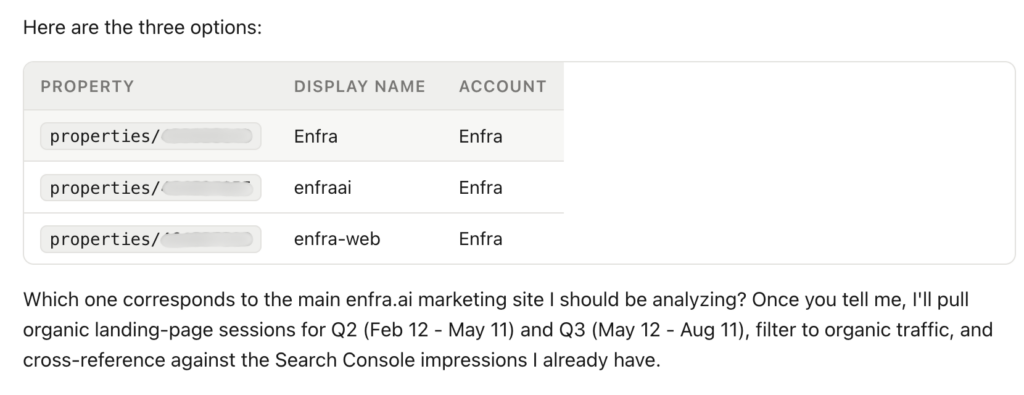
- Confirm the connection – One click and the property is linked.
Once that’s done, you can ask Enfra things like “which landing pages have the highest bounce rate?” or “compare GA4 organic sessions to Search Console clicks for my website” and it will pull the data live.
What you can actually do with GA4 + Search Console
Connecting GA4 is useful because it gives Enfra another dataset. But connecting it to your existing SEO data is where things get interesting.

Here are six questions you can now ask:
1. Find pages that rank but don’t convert
Try:
“Find pages that rank in positions 4–15 in Google but have a bounce rate over 70% in GA4.”
A page can look successful in Search Console because it ranks and attracts clicks.
But if those visitors aren’t engaging or converting, the SEO picture is incomplete.
This helps you find the classic “ranking for nothing” problem: pages that earn visibility but aren’t doing enough once the visitor arrives.
Instead of simply asking “Which pages should I rank higher?”, you can start asking “Which pages deserve better visibility because they actually perform once people arrive?”
2. Spot landing pages where organic traffic dropped after a redesign
Try:
“Compare GA4 organic landing-page sessions this quarter vs. last quarter and flag pages where organic sessions dropped more than 30% but impressions in Search Console held steady.”
A redesign doesn’t always announce itself as an SEO problem immediately.
A page can maintain relatively stable search impressions while something about the new experience causes organic visitors to engage less, or disappear altogether.
Cross-referencing GA4 sessions with Search Console impressions gives you a way to investigate that gap instead of looking at search visibility alone.
3. Find content that’s engaging visitors but underperforming in search
Try:
“Which blog posts have GA4 avg engagement time over 2 minutes but Search Console position worse than 15?”
These are potential under-ranked winners.
The content already shows evidence of engagement, but search visibility isn’t matching that performance.
That makes these pages natural candidates for a refresh: you aren’t starting from scratch, and you already have behavioral evidence that the content is doing something right.
4. Build client reports around behavior – not just rankings
Try:
“Generate a monthly SEO report including organic sessions, engaged sessions, conversions, and top landing pages from GA4 – alongside Search Console query and page data.”
For agencies, this is where the integration can save more than just analysis time.
Instead of stitching together separate dashboards to explain how organic search is performing, you can ask Enfra for a report that brings search performance and visitor behavior into one view.
The result is a report that answers not just “What happened in search?”, but also “What did those visitors do?”
You can also have Enfra deliver these reports directly to your team’s Slack or Google Chat, so the insights don’t get buried in another dashboard. If you want to see how Enfra turns SEO analysis into recurring chat-based reports, check out our Slack and Google Chat integration guide.
5. Catch money pages that quietly stop performing
Important pages don’t always fail loudly.
If a money page suddenly stops receiving traffic, GA4 can provide another signal that something may have gone wrong. You can then pair that drop with Enfra’s page monitoring data to investigate whether the page was unpublished, returned an error, or otherwise became inaccessible.
Instead of treating a technical issue and a traffic drop as separate problems, you can connect the two.
6. Cross-reference paid landing pages with conversion data
GA4 also lets you take the conversation beyond organic search.
Try:
“Find pages receiving Google Ads traffic where GA4 shows a conversion rate under 1% – flag for copy review.”
Now the same chat can bring together paid traffic, landing-page behavior, and conversion performance.
That gives you a way to identify pages that are attracting traffic but failing to turn that traffic into results, without manually moving between datasets.
The bigger change: your prompts now have more context
The biggest benefit of the integration isn’t that Enfra can answer a few new GA4 questions.
It’s that existing SEO questions can now have more context behind their answers.
For example:
“Which pages lost the most organic traffic last month?”
With Search Console alone, Enfra can investigate the search-performance side of the question.
With GA4 connected, it can also bring in session-quality data, helping you distinguish a drop in clicks from a broader decline in visitor engagement.
That’s the difference between adding another integration and adding another layer of reasoning.
Enfra can now bring GA4 into prompts alongside Search Console, live SERP data, your sitemap, knowledge base, and WordPress data – so you can ask one question and have the agent connect the relevant sources.
Frequently Asked Questions
Is GA4 included in my existing Enfra plan?
Yes. GA4 integration is included with your paid Enfra subscription at no additional cost.
Does Enfra store my GA4 data?
No. Enfra reads your GA4 property on demand through Google’s API. You can revoke access at any time.
Can I limit which GA4 property the agent reads?
Yes. You choose the GA4 property when you connect it, and the agent will only read that property.
What happens if I disconnect Search Console?
Nothing changes for GA4. Each integration is independent, so disconnecting Search Console won’t disconnect your GA4 property.
What does “after-click data” mean?
“After-click data” refers to the behavioral context GA4 provides about what happens after someone visits your site – including engagement, conversions, scroll behavior, and the gap between ranking and converting.
Try a GA4-powered prompt right now
Connect GA4 in Enfra, then run one of the prompts above against your own data.
The point isn’t to add another dashboard to your SEO stack. It’s to give Enfra more context so you can ask a question once – and have the agent reason across the data needed to answer it.

Marketing Engineer at Enfra | Building agentic systems, web applications, and software products.