
Refreshing an old blog post means going back to an existing article and updating what has changed – stats, examples, structure, internal links, and more – so it can compete for the queries it should rank for.
This post is the tactical layer beneath the content refresh framework: 12 moves you can run in order, in Enfra, on a post that’s slipping.
Should You Refresh Your Post?
Before editing, check whether the post actually needs a refresh. Run these four prompts in Enfra:
- Is it still ranking, but slipping?
"Show me [post]'s GSC clicks and position over the last 90 days." - Are the stats or examples outdated?
"Fact-check [post] and highlight anything that's older than 2025" - What has changed for a query?
"Analyze the [query] and tell me if my post covers the information in the AI Overview and the top 10 SERP results" - Do you have new information the post doesn’t?
"What's missing from [post] compared with the current top 3 SERP results?"
If two or more apply, move into the refresh workflow below. To keep track of the changes, use our content refresh checklist on Google Sheets as you work through each step.
The 12 Moves to Refresh One Post
1. Run a content audit
Start by auditing the URL in Enfra. Ask for a scorecard covering on-page SEO, content quality, internal links, and schema.
The audit gives you a baseline for what is working and what needs attention. Keep the strengths of the existing page while fixing the weaknesses.
If you need a deeper explanation of what to look for and which parameters to use, see our content audit guide.
2. Pull GSC data
Get the URL’s position, clicks, impressions, and top queries for the last 90 days. Save these numbers so you have a baseline to compare against after the refresh.
You do not have to manually collect and analyze this data for every refresh. With Search Console and Google Analytics connected, most of the performance checking takes far less manual work.
3. Check the live SERP
Look at the current results for the post’s top query. Focus on what is ranking now and how those pages approach the topic.
You don’t have to search each query manually. Review the current ranking pages along with the formats, sections, and FAQs they use.

4. Turn the SERP findings into a content gap
Once you understand the current SERP, compare your post with the pages ranking for the target query. Look for relevant topics, questions, or information your page does not cover.
These gaps become your edit list. They tell you what the refreshed article needs to address rather than giving you a list of keywords to insert mechanically.
Use one primary keyword to keep the page focused on its main topic. Add secondary keywords only when they represent relevant variations or subtopics that belong naturally in the article.
If you need a broader approach to finding relevant, specific queries, see our guide to niche keyword research.
5. Rewrite the meta title and description
Generate a new title and meta description based on the existing page and current SERP. Treat the output as a first draft and edit it before publishing.

For the broader principles behind improving existing pages, from meta titles and descriptions to other on-page SEO elements, see our guide to content optimization.
6. Rewrite the intro
Rework the first 100 words using the updated keyword data, SERP, and content-gap analysis as inputs.
- Lead with the answer – Make the page’s value clear immediately instead of spending several sentences on setup.
- Match the search intent – Frame the introduction around what the reader is actually looking for.
- Use the primary keyword naturally – Include it early when it fits the sentence and keeps the topic clear.
- Show credibility briefly – Mention your methodology, data source, testing, or experience when it adds useful context.
- Cut filler – Remove phrases like “In today’s digital landscape,” “Whether you’re a beginner or expert,” and “Let’s dive in.”
- Write the intro last – Draft it after the rest of the refresh so it reflects what the finished article actually delivers.
If the refresh involves changes beyond the intro, our content refresh checklist covers how the pieces fit together.
7. Update outdated information
Find old statistics, dates, product references, screenshots, and examples throughout the post.
Enfra can identify information that needs to be checked and where the updated information belongs.
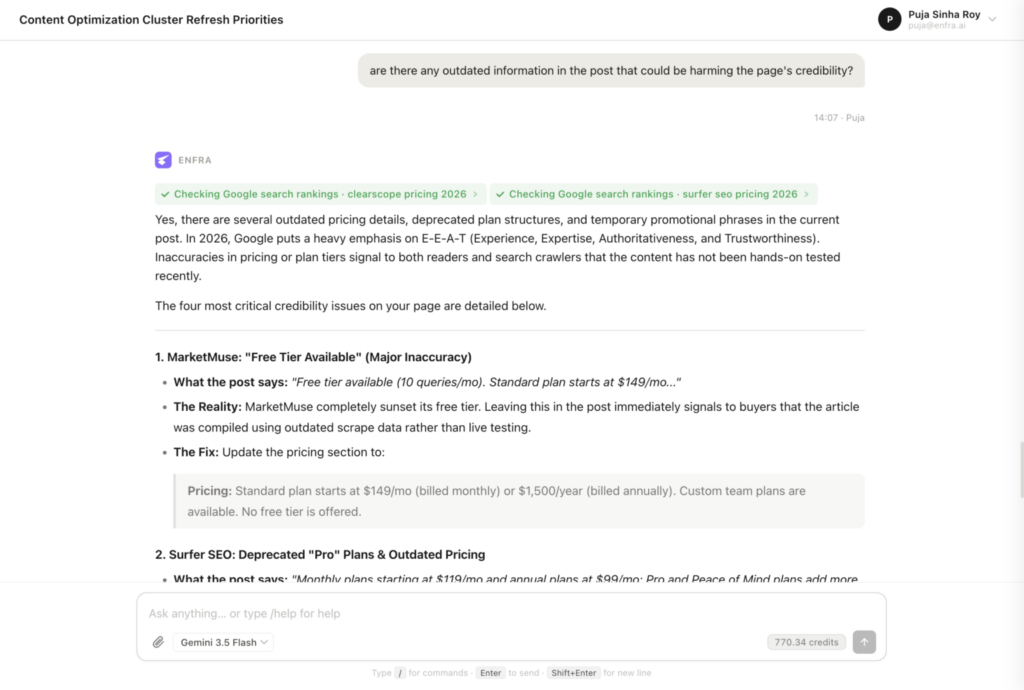
Do not update a date or statistic without checking whether the surrounding claim still holds.
8. Add missing sections
Add sections that address useful gaps in the current search results or answer questions your existing article leaves unresolved.
Identify what is missing from the post and where each addition should fit.
Depending on the topic, useful additions may include:
- A definition early in the article.
- A comparison table.
- When not to use the approach.
- Specific time or cost information.
- An FAQ section for genuinely useful questions.
- A worked example or case study.
- A section explaining how to measure the result.
- Relevant internal links to related posts.
- A named framework or original model.
- A clear summary or bottom line.
You do not need to add every element. Only add sections that improve the page for the current intent.
9. Fix internal links
Run an internal-linking audit and review the targets it surfaces. Add links that genuinely help the reader move to the next relevant topic.
Avoid adding links simply to increase the number of internal links on the page.


10. Build or refresh the FAQs
Use People Also Ask questions and competitor FAQs to identify questions worth answering.
Remove questions that no longer match the page’s intent instead of keeping an FAQ section for its own sake.
Ask Enfra:
“Update the FAQ section of [post] based on what’s ranking in search engines and getting cited in AI answers.”
Use any relevant secondary keywords naturally when answering these questions rather than forcing them into the copy.
11. Update the date and request re-indexing
Update the publish or modified date only after making substantive changes to the page.
Once the refresh is complete, request re-indexing in Google Search Console so Google can recrawl the updated URL.
12. Document and share the changes
Record what changed and why so your team can review the refresh later.
Let Enfra export the changes to Slack or Google Chat if your team needs visibility into the work.
Keep the comparison focused on the changes made and the reasoning behind them.
The 30/60/90 Day Measurement Plan
Don’t stop measuring when the refreshed page goes live. Record the same core metrics at each checkpoint so you can compare the result against the original baseline.
| Checkpoint | What to measure |
|---|---|
| Day 0 | Position, clicks, impressions, top queries, and the audit score |
| Day 30 | Position movement, click change, and a repeat audit |
| Day 60 | CTR, new queries, and changes in the audit score |
| Day 90 | Overall ranking and traffic changes, plus whether the page is appearing in relevant AI search experiences |
If the page has not improved by Day 90, return to the SERP and keyword-gap analysis. The problem may be that the refresh did not address the right gap.
The content refresh framework covers measurement and prioritization across a broader set of pages. This workflow is the unit of work for one post.
Refresh This Post vs. Write a New One
Refresh the existing URL if:
- The page has accumulated authority.
- The search intent is still substantially the same.
- The gaps can be addressed without replacing most of the article.
- The post has substantial backlinks, impressions and clicks.
Write a new post if:
- The search intent has changed substantially.
- The existing URL has little value to preserve.
- You would need to replace most of the article to satisfy the current intent.
Note: A few referring domains alone should not decide the outcome. Consider the URL’s existing rankings, backlinks, traffic, and relevance together before choosing between a refresh and a new post.
Common Mistakes When Refreshing a Single Post
- Changing the URL unnecessarily.
If the existing URL has accumulated rankings and links, preserve it unless there is a strong reason to change it. - Updating the date without updating the content.
A newer date does not make outdated information useful. This is specifically called out in Google Helpful Content guidelines. - Stuffing in keywords competitors use.
Use the keyword gap to identify useful topics, not as a reason to force phrases into the copy. - Deleting a useful FAQ section.
Review which questions still match the page’s intent before removing them. - Skipping the current SERP.
Competitors and search intent can change, so review the current results before deciding what to edit.
Frequently Asked Questions
How often should you refresh old blog posts?
Evergreen posts can be reviewed every 6–12 months, but a calendar should not be the only trigger. Refresh sooner when rankings, traffic, or search intent indicate that the page needs attention.
Does refreshing old blog posts help SEO?
It can, particularly when the refresh addresses a real ranking or relevance problem. The outcome depends on what changed, how well the page now satisfies the intent, and how competitive the SERP is.
How long does it take to refresh one blog post?
A straightforward refresh can take 1–3 hours, depending on the page and how much needs to change. Running the audit, SERP review, and gap analysis in Enfra can reduce the manual research involved.
Should you change the URL when refreshing?
Usually, no. If the existing URL has accumulated rankings or links, keeping it preserves the value already associated with that page.
Conclusion
Refreshing an old blog post is not about making it look newer. It is about checking whether the URL is still worth improving, seeing what now ranks for the topic, and updating the page so it better matches current search intent.
Work through the refresh in order: confirm the post needs attention, audit the page, review the live SERP, turn the gaps into an edit list, update the copy, links, FAQs, and metadata, then measure the result over 30, 60, and 90 days. That gives you a practical process for improving one post based on evidence instead of guesswork.
For teams doing this across multiple URLs, the content refresh framework helps with prioritization and tracking.
Run the post through Enfra to audit the page, compare it against the current SERP, and turn the gaps into a clear refresh plan before you start editing.

Marketing Engineer at Enfra | Building agentic systems, web applications, and software products.