A content refresh is the process of updating an existing page to keep its information accurate, align it with current search intent, and improve its ability to rank and earn clicks.
Instead of starting from scratch, you run content refresh on a page that already has search visibility, backlinks, and historical performance.
Use this checklist as part of your broader content strategy to work through four phases: audit, diagnosis, execution, and post-publish monitoring. If you’re comparing tooling for the job, start with our list of the best content optimization tools.
Get the Free Content Refresh Checklist

Make a copy of our Google Sheets template and track every refresh from audit to post-publish monitoring.
Make a copy in Google Sheets →
Phase 1: Audit and Prioritize Your Content
Start with your existing pages. The goal is to find URLs where an update has a realistic opportunity to improve performance.
Export search performance data
- Open Google Search Console and go to Search results.
- Set the date range to the last 90 days.
- Export the data with clicks, impressions, CTR, and average position.
- Review performance by page to identify URLs worth investigating.
With Enfra’s Google Analytics and Search Console integrations, you can bring performance data into your workflow without manually pulling it for every review cycle.
Identify striking-distance pages
- Filter for pages ranking between positions 4 and 15.
- Prioritize pages with substantial impressions but relatively low CTR.
- Compare current performance with an earlier period to find pages that have recently lost clicks or rankings.
- Prioritize pages where a small ranking improvement could bring meaningful additional traffic.
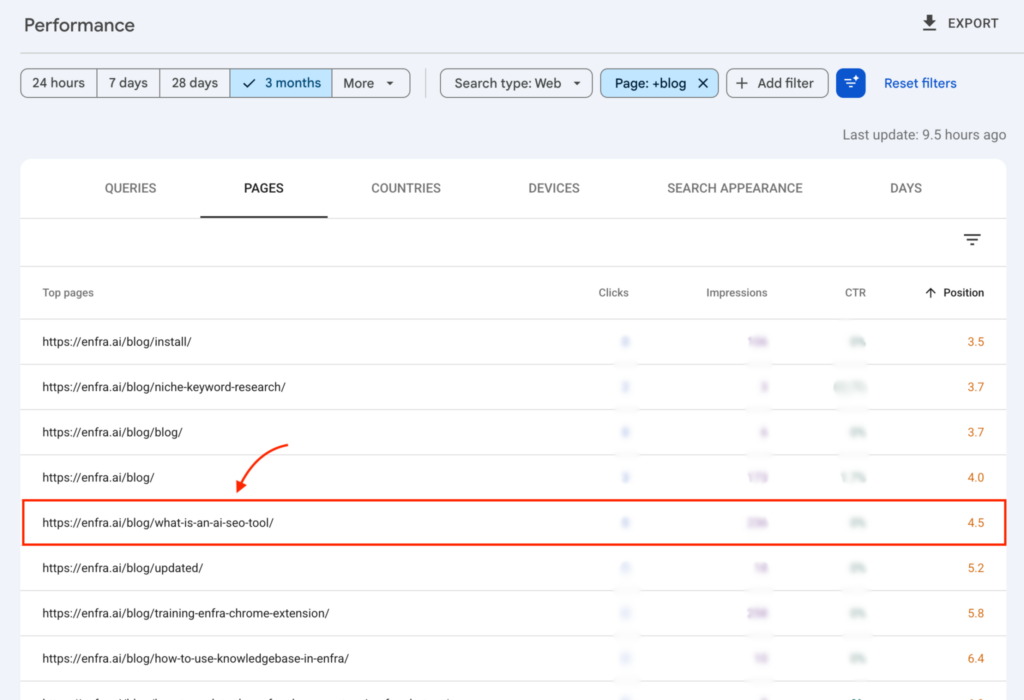
See our content optimization strategy guide for a deeper look at how the striking-distance filter works.
Tag your target URLs
Assign each page to one of three actions:
- Refresh: Keep the existing structure and update outdated information, links, examples, or thin sections.
- Rewrite: Replace most of the page because the topic or search intent has changed significantly.
- Redirect or merge: Consolidate overlapping pages targeting the same topic into one stronger URL.

Phase 2: Diagnose the Traffic Decline
Do not start rewriting until you know what changed. A traffic drop can come from outdated information, changing search intent, stronger competitors, or technical issues.
Check search intent
- Search the page’s primary keyword in Google.
- Compare the current results with your page.
- Check whether the dominant content type has changed. For example, the results may now favor product pages, comparison pages, or tools instead of informational guides.
- Decide whether your page still matches what searchers are looking for.
With Enfra, now you don’t have to analyze the SERP manually.
Simply ask:
“Analyze the live SERP for [primary keyword]. Identify the dominant search intent, summarize the content types currently ranking, and tell me whether my page matches that intent. Highlight any major intent gaps I should address in a content refresh.”
It will review the live SERP for you, analyze what the current search results look like, and help you decide whether your page still matches the intent searchers are looking for.
Compare competitor coverage
- Review the top three ranking pages.
- List the major subtopics they cover.
- Note useful formats they use, such as comparison tables, examples, templates, or step-by-step instructions.
- Identify important questions your page does not answer.

The goal is not copy competitors. It’s to use the comparison to identify gaps in your own coverage.
Check outdated facts and media
- Replace outdated statistics with current, credible sources.
- Update old years and examples where they are no longer relevant.
- Replace broken or outdated screenshots when the interface has changed.
- Fix broken links and remove references that are no longer useful.
- Check product names, features, pricing, and other time-sensitive details for accuracy.
Keep the page accurate and useful rather than updating dates or content simply to make it appear fresh. Google recommends people-first content and specifically cautions against changing page dates when the underlying content has not substantially changed.
Phase 3: Execute the Content Refresh
Once you know what needs to change, update the page based on the diagnosis rather than making cosmetic edits.
Strengthen the introduction
- Answer the primary query early.
- Define the topic clearly in the opening section.
- Remove introductions that delay the answer.
- Give readers enough context to understand what the page will help them accomplish.
Keep the introduction concise. This remains one of the core pillars of our content optimization framework. Readers should know what the page covers without having to work through several paragraphs first.
Fill the content gaps
- Add sections for important subtopics your page currently misses.
- Expand sections that lack useful detail.
- Add original examples, tables, data, or instructions where they improve the answer.
- Remove sections that no longer serve the reader or match the current intent.
Every addition should solve a specific gap you identified during the diagnosis phase.

Improve keyword coverage
- Use your primary keyword where it naturally fits.
- Add relevant secondary terms in headings and body copy.
- Use related terminology that helps explain the topic clearly.
- Remove repetitive keyword mentions that make the copy harder to read.
The good news? You don’t have to spend hours digging through keywords yourself. Enfra can surface the relevant terms and opportunities for you, leaving you to focus on the actual content refresh.


Audit internal links
- Add links to relevant articles published since the original post.
- Link to supporting resources where they provide useful next steps.
- Update outdated internal links.
- Remove links that no longer add value.
Use descriptive anchor text that tells readers what they will find when they click.
Structure answers for AI search
- Turn important questions into clear headings.
- Answer each question directly in the paragraph that follows.
- Use concise definitions for terms that need explanation.
- Break complex information into lists, tables, and clearly labeled sections.
- Support factual claims with specific, trustworthy information.
Google recommends applying established SEO best practices to content intended to appear in AI Overviews and AI Mode, including making content easy for both users and search systems to understand. See Google’s guidance on optimizing for generative AI features.
Phase 4: Post-Publish and Monitor
Publishing the update is not the final step. Record what changed and measure whether the page improves.
Update the publication date when appropriate
- Change the visible update date when the page has undergone a substantial refresh.
- Do not change the date for minor edits such as fixing a typo or replacing one link.
- Make sure the date accurately reflects the page’s current state.
The date should communicate that the content was meaningfully reviewed, not simply changed to make the page appear new.
Request indexing in Google Search Console
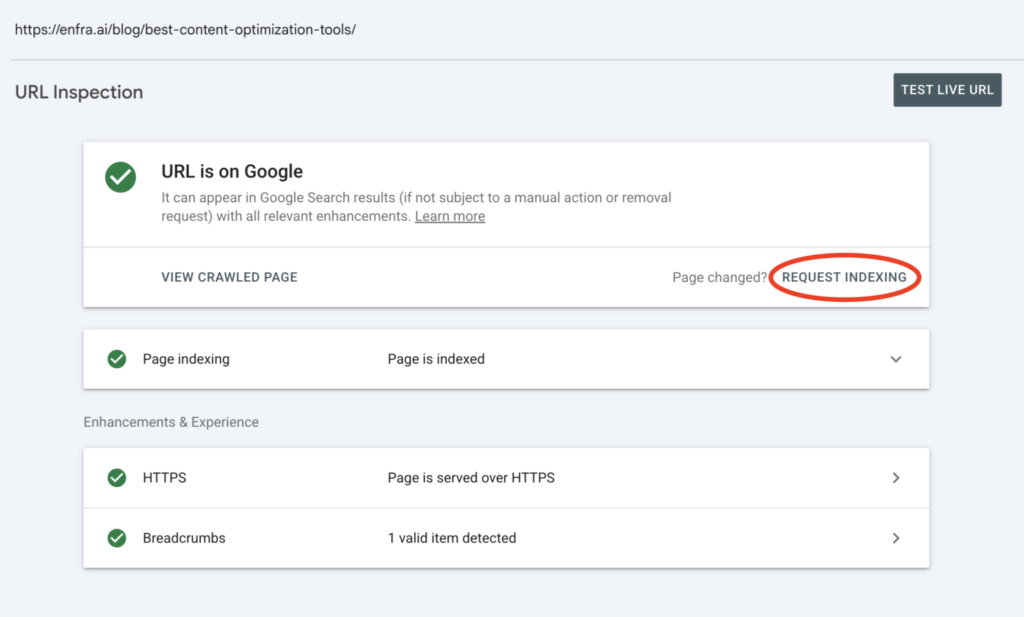
- Open URL Inspection in Google Search Console.
- Enter the refreshed URL.
- Check the page’s indexing status.
- Click “Request Indexing” if the page is eligible for a new crawl.
This gives Google a signal that the page has changed, but it does not guarantee a specific crawl or ranking timeline.
Measure the ranking and traffic lift
- Record the page’s baseline clicks, impressions, CTR, and average position before the refresh.
- Review the same metrics 30 days after the update.
- Review them again at 60 days.
- Compare the results with the original baseline.
For the record, Enfra can turn each step from diagnosis to review into assigned tasks in Zoho Projects, so the right person knows exactly what needs to be updated and where.
Common Mistakes to Avoid When Updating Content
Not every page is worth refreshing. Avoid these mistakes to focus your effort on pages with a realistic opportunity to recover or grow.
Refreshing the wrong pages
Don’t refresh every declining page at once. Start with pages that still have search demand, are relevant to your business, and have room to improve.
If a topic has lost most of its search demand or no longer matches what people are looking for, updating the page is unlikely to produce meaningful results.
Prioritize pages where improving the content could realistically lead to more traffic or conversions.
Skipping the performance check
Don’t decide what to refresh based on how old a page looks. Check its recent performance first.
Use Google Search Console and Google Analytics to identify pages that have lost traffic, clicks, impressions, or conversions. Compare recent performance with the page’s previous performance to identify meaningful declines.
This is essentially a content audit: you are identifying which existing pages have a performance problem worth fixing and which ones should be left alone.
Optimizing for outdated keywords
Once you’ve identified a page worth refreshing, check which queries are driving its performance today.
The keyword that originally brought traffic to the page may no longer be its most valuable query. A secondary query may have grown into a significant source of impressions or clicks, while the original target keyword has declined.
Use niche keyword research to identify relevant search terms and guide the refresh. Optimize for what people are searching for now instead of forcing the page back toward its original keyword target.
Making cosmetic changes instead of improving the content
Changing the publication date, rewriting the meta description, or replacing a few sentences does not make a meaningful refresh.
Focus on improving the substance of the page. Update outdated information, close gaps in the answer, add useful examples, and make sure the content matches the current search intent.
The goal is simple: make the page more useful than the version you started with.
Changing the URL unnecessarily
Keep the existing URL unless there is a strong reason to change it.
An established page may already have backlinks, internal links, and ranking history attached to its URL. Changing it introduces redirects and can disrupt existing search visibility.
If the problem is outdated content, fix the content rather than changing the URL.
Forgetting to update internal links
A refresh can create new opportunities for internal linking. If you add a new section or cover a topic in more depth, check whether another relevant page should now link to it.
Also look for newer articles that should link back to the refreshed page. This keeps related content connected and helps search engines understand the relationship between pages in your topical authority structure.
Finally, check external links for broken or outdated sources and replace them when a more authoritative reference is available.
Frequently Asked Questions
What is a content refresh and when should you run one?
A content refresh is updating an existing page to keep its information accurate and aligned with current search intent. You should run one when a page shows clear signs of decline: falling organic traffic, a ranking that has slipped from page one to page two, outdated statistics or screenshots, or competitors publishing stronger answers to questions your page should cover. The goal is to improve a page you have already built, not start over with a new URL.
What is an SEO content refresh checklist?
An SEO content refresh checklist is a step-by-step list that walks you through the four phases of updating a page for better search performance: audit, diagnosis, execution, and monitoring. The audit phase uses Search Console to find pages worth updating. The diagnosis phase checks whether search intent, competitor coverage, or factual accuracy has changed. The execution phase makes the updates. The monitoring phase measures whether the changes actually moved rankings and clicks. A good checklist turns a content refresh from a guessing game into a repeatable process.
What is content decay and how do you fix it?
Content decay is the gradual loss of search traffic and keyword rankings on pages that used to perform well. It happens when competitors publish newer answers, when the underlying topic changes, or when the information on the page becomes outdated. The fix is a targeted content refresh focused on the page’s weakest sections, plus internal links to and from newer relevant content. Treating decay as a quarterly check, not a one-off crisis, is what separates a reactive content team from a proactive one.
How do you refresh a blog post without losing rankings?
You refresh a blog post without losing rankings by keeping three things stable: the URL, the core topic, and the original search intent. Update outdated facts, replace old screenshots, fill in missing subtopics, fix broken links, and improve structure. Avoid rewriting the entire angle or switching the target keyword, since those reset ranking history and usually need a redirect. Refresh in place, request re-indexing in Search Console, and measure impact over 30 to 60 days.
What is the difference between a content refresh and a content rewrite?
A content refresh improves an existing page while keeping its URL, topic, and broad intent. A content rewrite replaces most of the page because the original topic or intent has shifted so much that the existing structure cannot be saved. Use a refresh when the page is still answering the right question but doing it imperfectly. Use a rewrite when the page itself is the wrong answer for what searchers want today. Picking the right option matters because rewrites need new URLs, redirects, and a longer recovery window.
How do you measure whether a content refresh worked?
You measure whether a content refresh worked by comparing a baseline of clicks, impressions, average position, and CTR from Search Console before the update with the same metrics 30, 60, and 90 days after. A successful refresh usually shows rankings improving for original queries, CTR rising, and impressions regaining ground. Watch GA4 engagement signals too, since traffic lift without engagement usually means the wrong intent is being matched. The page performing better for the right reasons is the only true measure of success.
Conclusion
A content refresh isn’t about changing a few dates and calling a page updated. The goal is to understand why a page lost performance, fix what has changed, and measure whether the update worked.
Use this checklist to keep the process consistent:
- Audit your existing pages and prioritize the ones with the most opportunity.
- Diagnose changes in search intent, competitor coverage, and outdated content.
- Execute the updates that address those gaps.
- Monitor clicks, impressions, CTR, and rankings after publishing.
Use our Content Refresh Checklist to track each refresh from audit through post-publish monitoring.
Get the Google Sheets template →

Marketing Engineer at Enfra | Building agentic systems, web applications, and software products.