
Automated SEO reporting saves teams from copying data into spreadsheets and rebuilding reports every week or month. But saving time on data collection is only half the job.
For agencies, SEO client reporting should do more than summarize rankings and traffic. It should show clients what changed, what work was completed, how performance is progressing, and what needs to happen next. Automation makes that process repeatable without turning every client update into a manual reporting exercise.
The goal is to automate repetitive reporting tasks without losing the context people need to make decisions.
What if your SEO reports did more than show numbers?
Turn recurring SEO data into client reports that show what changed, what your team accomplished, and what comes next.
Automate Your SEO Reporting →What Are Automated SEO Reports?
Automated SEO reports collect search performance data, organize it into a consistent format, and deliver it on a recurring schedule with minimal manual work.
Depending on your reporting needs, they can include:
- Keyword rankings: Changes in target keyword positions and search visibility.
- Google Search Console data: Clicks, impressions, CTR, and average position.
- GA4 data: Organic traffic and relevant engagement metrics.
- Page and technical changes: Pages gaining or losing visibility, indexing issues, and other technical problems.
- Work completed: Content updates, technical fixes, new pages, and other completed tasks.
- Next steps: Recommended actions, priorities, owners, and deadlines.
The difference between a data export and a useful report is context. A report should help readers understand what changed, why it matters, and what the team plans to do about it.
What Should You Automate First?
You don’t need to automate every part of SEO reporting at once. Start with the tasks your team repeats every reporting cycle.
1. Automate recurring data collection
If someone copies rankings, Search Console metrics, GA4 data, and technical findings into a spreadsheet every month, start there.
Connect the sources you use regularly and standardize the metrics you track. This reduces repetitive work and makes reporting more consistent.
2. Track changes between reporting periods
Collecting numbers is useful, but comparing them is what helps identify opportunities and problems.
Automate recurring checks for:
- Keywords gaining or losing visibility.
- Pages with significant changes in clicks or impressions.
- Recently updated pages and their subsequent performance.
- New technical issues that need attention.
Use these changes to decide which pages or issues deserve a closer look.
3. Standardize report structure
Create a repeatable template with sections for performance, major changes, completed work, risks, and next steps. We’ve already covered the basic structure of an SEO report in our SEO reporting guide.
A consistent structure makes reports easier to scan and compare. It also prevents the team from rebuilding the same document from scratch every cycle.
4. Schedule report generation and delivery
Set a reporting cadence that matches your team’s needs. Configure reports to reach the right stakeholders through their preferred channels, whether that’s email, Slack, Google Chat, or a shared document.
The objective is to remove recurring administrative work without sending reports before they’re ready to be reviewed.
What Should an Automated SEO Report Include?
A useful report covers performance, the work behind that performance, and the next actions. The exact metrics depend on who will read it.
| Report section | What to include | Why it matters |
|---|---|---|
| Rankings and visibility | Target keyword movement and major gains or losses | Shows how search visibility is changing |
| Organic search performance | Clicks, impressions, CTR, and average position by page or query | Connects visibility to search traffic |
| Landing page changes | Pages gaining or losing traction and recently updated pages | Helps identify pages that need attention |
| Technical issues | Indexing problems, broken pages, crawl issues, and other relevant errors | Identifies potential barriers to performance |
| Work completed | Content updates, new pages, fixes, and completed tasks | Shows what the team delivered |
| Next actions | Priorities, owners, and deadlines | Turns findings into a plan |
Tailor the report to its audience
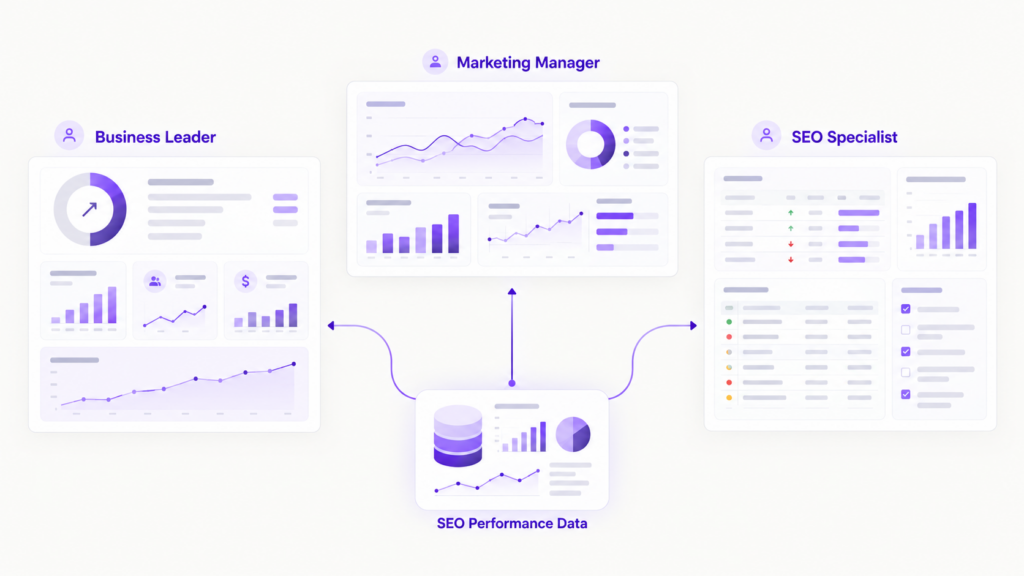
Not everyone needs the same level of detail. An agency client may want a concise progress update, while an SEO specialist needs enough information to investigate a decline.
| Audience | Prioritize | Avoid |
|---|---|---|
| Agency clients | Progress, business impact, completed work, and next steps | Dense exports with little explanation |
| In-house SEO leads | Page-level changes, technical issues, and opportunities. Enfra’s Page Monitor might be a good place to start. | High-level summaries without supporting details |
| Marketing leadership | Organic growth, contribution to business goals, priorities, and major risks | Excessive tactical detail |
| Delivery teams | Specific changes, issue lists, owners, and deadlines | Executive summaries without actionable tasks |
Keep the underlying data available for people who need to investigate. The main report should emphasize the information its intended audience needs to act on.
Include completed work and next steps
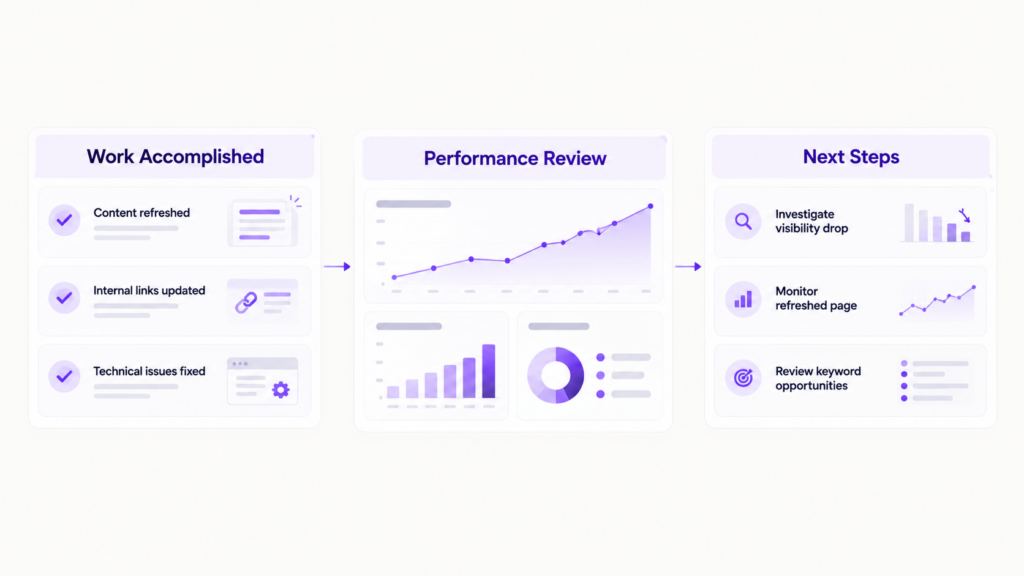
Performance metrics don’t tell the whole story. A report should also document what the team did during the reporting period and what it plans to do next.
For example, if a page gained clicks after a content refresh, record the update alongside the performance change. If another page lost visibility, identify the investigation or follow-up task.
This doesn’t automatically prove that a particular change caused a result. It gives the team a clearer basis for interpreting performance and deciding what to investigate next.
Connect SEO Work to Results →Manual Reporting vs. Dashboards vs. Automated SEO Reporting
Teams typically choose between assembling reports manually, using dashboards, or building a more complete reporting workflow.
| Approach | Strengths | Limitations | Best fit |
|---|---|---|---|
| Manual spreadsheets and slide decks | Flexible, inexpensive to start, easy to customize | Time-consuming, prone to copy-paste errors, difficult to scale | Small teams with limited reporting needs |
| Dashboards | Useful for exploring data, filtering metrics, and monitoring trends | May require manual interpretation and separate documentation of completed work | Teams that need ongoing performance visibility |
| Automated reporting workflows | Repeatable collection, scheduled delivery, consistent reporting, and potential task follow-up | Requires setup, reliable data sources, and a well-defined process | Agencies and in-house teams with recurring reporting needs |
When manual reporting stops working
Manual reporting can be practical when you have a small number of pages or clients. The problem starts when each additional account, stakeholder, or reporting requirement adds more work.
Data collection, formatting, quality checks, and last-minute revisions can turn a straightforward report into a recurring administrative burden.
Automation becomes more valuable when the same tasks must be repeated reliably across multiple reporting cycles.
Why dashboards aren’t the whole solution
Dashboards help people explore performance data. Reports communicate what matters to a particular audience.
A dashboard might show that organic clicks declined. A useful report adds the affected pages, relevant context, the team’s findings, and the next investigation or action.
You may need both. The important distinction is that automating data visualization doesn’t necessarily automate the reporting process.
Which Features Matter in Automated SEO Reporting Software?
Evaluate tools based on the work they remove, not the number of features listed on their pricing page.
Look for:
- Data integrations: Connections to Google Search Console, GA4, ranking sources, and relevant technical SEO tools.
- Scheduled reporting: Recurring report generation and delivery.
- Customizable templates: The ability to standardize sections and adapt reports for different audiences.
- Change tracking: Visibility into important movements in rankings, traffic, and page performance.
- Sharing and exports: Formats and delivery channels that fit your team’s workflow.
- Work tracking: A way to document completed tasks and connect findings to follow-up actions.
- Collaboration: Clear ownership and coordination between people responsible for reporting and execution using integrations like Zoho Projects.
Agencies should pay particular attention to repeatable reporting across clients, consistent templates, clean exports, and white-label options where needed.
In-house SEO teams should prioritize visibility across content and marketing teams, reporting tied to completed work, and a clear way to set priorities for the next reporting period.
The right feature set depends on your workflow. A tool that collects every possible metric won’t necessarily save time if the team still has to assemble, interpret, and distribute the report manually.
How to Build an Automated SEO Reporting Workflow
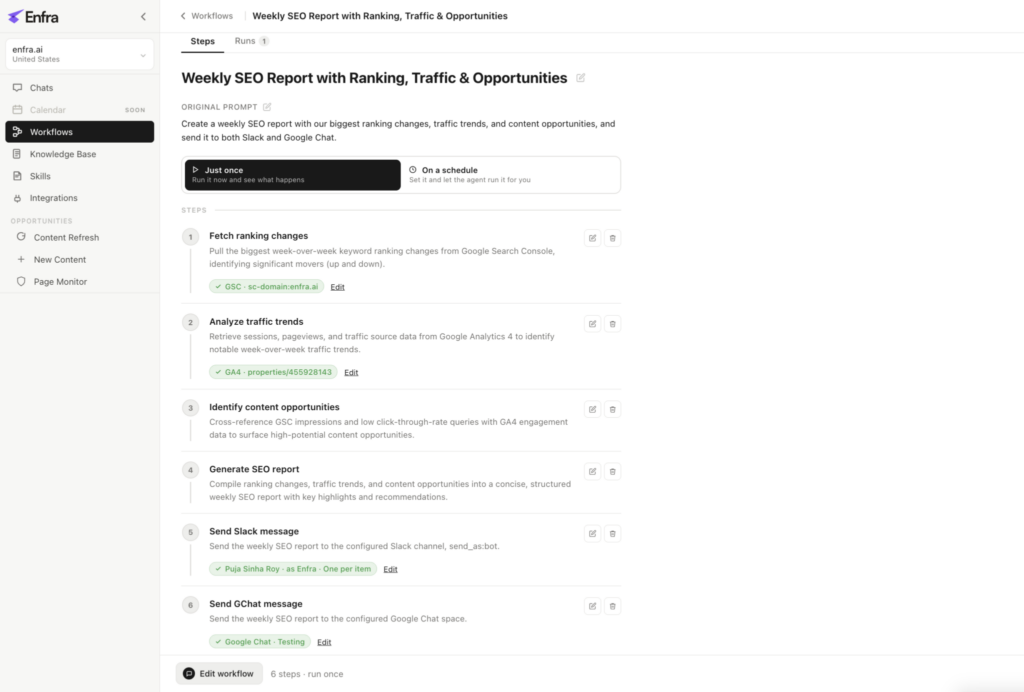
Automate SEO reporting with Enfra – from ranking changes to content opportunities, delivered straight to your inbox
You can build a repeatable process in six steps.
Step 1: Choose your data sources
Identify the sources you need for your recurring reports, such as Google Search Console, GA4, ranking data, page monitoring, and technical SEO checks.
Start with the sources your team already uses instead of adding integrations without a clear purpose.
Step 2: Define the report template
Decide which metrics, changes, completed tasks, and next steps belong in the report. Create a consistent structure that can be reused each cycle.
Step 3: Set the reporting cadence
Choose how frequently each audience needs an update. Weekly reports may suit ongoing agency delivery, while monthly summaries may work better for leadership reviews. Adjust the schedule to the decisions the report needs to support.
Step 4: Automate collection and delivery
Configure recurring data collection, report generation, and distribution. Assign each report to the appropriate recipients and delivery channel.
Step 5: Review the report before sending
Automation doesn’t eliminate the need for judgment. Review significant gains and losses, check for missing or inconsistent data, and add context where the numbers alone could be misleading.
Step 6: Turn findings into follow-up tasks
Record the actions that emerge from the report, assign owners, and set deadlines where appropriate. Carry unresolved issues into the next reporting cycle so they don’t disappear once the report has been sent.
Example: Weekly agency reporting
An agency reporting workflow might look like this:
- Collect ranking, Search Console, traffic, and issue data.
- Flag significant changes across each client’s website.
- Review anomalies and add brief explanations.
- Generate and deliver the report on schedule.
- Assign follow-up tasks for issues and opportunities.
Example: Monthly in-house SEO reporting
An in-house team might use a monthly workflow to:
- Compare organic search performance with the previous month.
- Identify pages with meaningful gains or losses.
- Summarize content updates, technical fixes, and other completed work.
- Highlight unresolved issues and potential risks.
- Agree on the next month’s priorities and owners.
These are starting points, not rigid rules. The best workflow is one that provides the right information at the right time without creating more administrative work.
Stop Building SEO Reports by Hand
Enfra brings SEO data and reporting into one workflow, so your team spends less time compiling reports and more time working on the findings.
See Enfra in Action →Common Mistakes to Avoid When Automating SEO Reports
Automation can make reporting faster and more consistent, but poor setup can preserve the same problems in a new format.
Automating everything at once. Start with the most repetitive, time-consuming tasks. Expand after the initial workflow is reliable.
Sending metrics without interpretation. Charts can show a change without explaining its significance. Review important movements and provide relevant context.
Overloading reports with data. Include metrics that support a decision or answer a stakeholder’s question. Keep deeper analysis available separately.
Sending the same report to everyone. Adapt the level of detail to the recipient’s responsibilities and information needs.
Failing to assign follow-up actions. If a report identifies an issue but nobody owns the next step, the reporting process ends without changing the work.
Skipping quality checks. Incorrect data, missing periods, and unexplained anomalies can undermine confidence in an otherwise automated report.
A practical rule: automate repetitive collection and formatting first, then improve interpretation, quality control, and follow-through.
How Enfra Helps Automate SEO Reporting
Enfra helps SEO teams connect recurring reporting with the work required to improve search performance.
Instead of treating each report as an isolated document, teams can build workflows around performance data, content work, technical monitoring, and follow-up tasks.
For agencies, this can help standardize recurring client reporting and reduce manual assembly.
For in-house SEO teams, it can help connect performance changes to completed work, unresolved issues, and upcoming priorities.
If your team still spends hours pulling data into spreadsheets or manually assembling recurring reports, explore Enfra to see how its SEO workflows can help reduce reporting overhead and keep the next steps clear.
Start Using Enfra →
Marketing Engineer at Enfra | Building agentic systems, web applications, and software products.