
A good article usually starts before anyone writes the first sentence.
It starts with a clear brief.
If you’re still figuring out what a brief does and why it matters, our SEO content brief guide covers that first. Here, we’ll focus on the format itself.
Most teams do not use one standard template. One writer gets a detailed outline. Another gets a Slack message and a keyword. A third gets a half-finished doc with no clear angle, no audience, and no next step. That is how content turns into rewrites, delays, and uneven quality.
A content brief template fixes that. It gives your team one repeatable way to explain what needs to be created, why it matters, and what good looks like before drafting starts.
Skip the guide → Start your first content briefWhat is a content brief template?
A content brief template is a reusable structure for planning a piece of content before it gets written.
It gives the writer and editor the information they need to do the job well. That usually includes the topic, audience, goal, angle, structure, references, and call to action.
Think of it as the working document that aligns strategy with execution. Instead of explaining expectations from scratch every time, you start from the same framework and adjust it for the page you need.
That matters because vague briefs create vague drafts. If the writer is guessing what the piece is meant to do, the result usually misses the mark. A stronger brief improves the first draft and often reduces how often a page needs heavy rewrites or early content refreshes later.

Ask Enfra to generate the content brief for your next post and watch it give you a research-backed brief with everything covered in our brief template.

The agent fetches everything from target keyword and user intent to recommended meta data and post outline – all in a single prompt.
When should you use a content brief template?
Use a content brief template any time someone is creating content for your business and needs direction before they begin.
That includes:
- blog posts
- SEO articles
- landing pages
- case-study-style articles
- thought leadership pieces
- freelancer assignments
- agency deliverables
- in-house content production
It is especially useful when more than one person is involved. If a strategist plans the topic, an editor reviews the draft, and a writer builds the first version, a brief keeps everyone working from the same expectations. It also makes it easier to assign the work clearly across a team using tools like Zoho Projects.
Templates also help when content volume increases. Once you move from occasional publishing to a steady workflow, briefing quality starts to affect speed, consistency, and approvals.
Why most briefs fail
Most bad briefs have the same problem: they leave too much open to interpretation.
Some are too thin. They mention a keyword and a title, then expect the writer to figure out the rest.
Others are too cluttered. They bury the important direction inside a long doc that never clearly answers who the page is for, what it needs to say, and what action the reader should take.
The best format sits in the middle. It gives enough information to remove confusion without turning the brief into a second draft of the article.
What every good content brief should include
A useful content brief does not need to be fancy. It just needs the right fields.
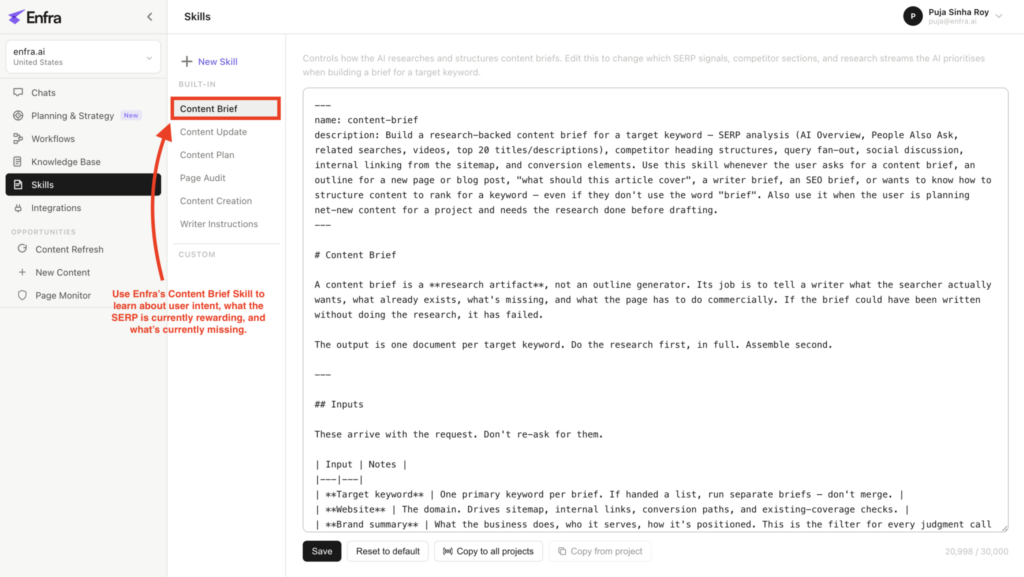
Enfra’s Content Brief Skill already covers everything we discuss in this section, so you spend more time writing and editing your draft and less time deciding the brief structure.
Here are the core sections worth including.
1. Page title or working title
This gives the piece a clear starting point. It does not need to be final, but it should point the writer in the right direction.
A weak title creates a vague brief. A strong title signals the topic, the audience, or the promise.
2. Page type
State what the asset is.
Examples:
- blog post
- landing page
- SEO article
- comparison page
- product education page
This matters because the structure of a landing page is not the structure of a blog post. The writer should not have to infer that from context.
3. Target keyword or main topic
If search is part of the goal, include the primary keyword.
You can also list secondary terms, but keep the focus clear. Too many targets in one brief usually lead to unfocused copy.
4. Search intent
Explain what the reader is trying to do when they search the topic.
For example:
- learn something
- compare options
- find a template
- evaluate a solution
- take action
This is one of the most important parts of an SEO brief. A page can mention the right keyword and still fail if it serves the wrong intent, especially when the query has clear commercial intent.
5. Target audience
Name the audience directly.
Do not just write “marketers” if the piece is really for content leads at B2B SaaS companies. The more specific the audience, the easier it is to choose the right examples, detail level, objections, and even the kind of niche keyword research that should shape the brief.
6. Page goal
What should this page accomplish?
Examples:
- explain a concept clearly
- rank for a target term
- capture leads
- support product education
- move readers toward a demo
A good brief gives the writer a purpose, not just a topic. If the goal is to support product-led growth, educate buyers, or move readers toward a demo, the brief should make that clear from the start.
7. Unique angle
This is where many teams fall short.
If the SERP already has ten pages saying roughly the same thing, your brief should explain what makes your version better, clearer, more useful, or more specific.
A unique angle can come from:
- firsthand product insight
- a clearer framework
- better examples
- stronger templates
- a narrower audience focus
- fresher data
- clearer workflow advice
8. Key points to include
These are the points the page must cover to be complete and accurate.
This section prevents missed context and weak coverage. It also reduces back-and-forth later during blog content revisions because the writer knows what cannot be left out.
9. Outline
A brief should give the writer a basic structure.
That does not mean scripting every paragraph. It means outlining the major sections so the piece has a clear shape before drafting starts.
10. Brand or tone notes
Writers need to know how the piece should sound.
Examples:
- simple and practical
- confident but not aggressive
- educational, not salesy
- direct and clear
- written for experienced operators, not beginners
If tone is not stated, each writer will fill in the gap differently. Teams usually solve that by storing brand voice, audience notes, and messaging rules in a shared knowledge base so every brief starts from the same context.
11. CTA
Every piece should have a next step.
That next step could be:
- start a trial
- book a demo
- read a related guide
- download a template
- contact sales
Without a CTA, content often informs but does not convert.
12. Sources, references, or examples
If the team already has relevant examples, internal data, SME notes, or competitor pages worth reviewing, include them in the brief.
This saves time and helps the writer stay accurate.
13. Visual guidance
Strong content often needs screenshots, charts, diagrams, tables, or callout graphics.
If visuals matter, say so in the brief. Do not assume someone will figure it out after the draft is done.
For how-to pieces, product screenshots are especially useful. They make the content easier to follow and more credible.
14. Owner, deadline, and approval notes
Operational details are not glamorous, but they keep the process moving.
Include:
- content owner
- writer
- reviewer
- due date
- status or approval expectations
A template should support workflow, not just writing quality.
A copyable content brief template
Here is a simple content brief template you can reuse across blog posts, landing pages, and SEO content.

Content brief template
Page title: [Add working title]
URL slug: [Add proposed slug]
Page type: [Blog post, landing page, SEO article, comparison page, etc.]
Primary keyword or topic: [Add main keyword]
Secondary keywords: [List supporting terms if needed]
Search intent: [Informational, commercial, transactional, or mixed]
Target audience: [Who this is for]
Primary goal: [What the page should achieve]
Secondary goal: [Optional supporting goal]
Unique angle: [What makes this version different or better]
Key points to cover:
- [Point 1]
- [Point 2]
- [Point 3]
- [Point 4]
Outline:
- Introduction
- [Section 1]
- [Section 2]
- [Section 3]
- [Section 4]
- Conclusion or next step
Brand voice notes: [How the content should sound]
Examples or references:
- [Competitor page]
- [Internal note]
- [SME input]
- [Source or research]
Visuals to include:
- [Screenshot]
- [Graphic]
- [Comparison image]
- [Chart or table]
Internal links to consider:
- [Related article]
- [Hub page]
- [Product or feature page if relevant]
CTA: [What the reader should do next]
Owner: [Name]
Writer: [Name]
Reviewer: [Name]
Deadline: [Date]
Definition of done: [What must be true before this is approved]
That is enough for most teams to create better drafts without making the process heavy.
Example: blog post content brief template
A blog post brief should help the writer educate the reader, keep the structure clear, and match the right level of detail. Here is how a blog brief version might look:
Blog post brief example
Page title: Content Brief Template: How to Standardize Content Before Writing
URL slug: /content-brief-template
Page type: Blog post
Primary keyword or topic: content brief template
Search intent: Informational with light commercial intent
Target audience: Content managers, SEO leads, and in-house marketing teams
Primary goal: Teach readers how to use a repeatable content brief format
Secondary goal: Introduce Enfra as a faster way to create structured briefs
Unique angle: Show one practical template plus versions for different page types instead of listing dozens of generic downloads
Key points to cover:
- what a content brief template is
- when to use one
- what every strong brief includes
- a copyable master template
- blog, landing page, and SEO variations
- common mistakes
- how to standardize the process
Outline:
- Intro
- What is a content brief template
- When to use one
- What every good brief includes
- Copyable template
- Template variations
- Mistakes to avoid
- Workflow advice
- CTA
Brand voice notes: Simple, direct, useful, and not overloaded with jargon
Visuals to include:
- screenshot of a completed brief
- comparison graphic showing weak brief vs strong brief
- screenshot of an Enfra-generated brief
CTA: Create your next content brief in Enfra
This format gives enough clarity to write the article without over-directing every paragraph.
Example: landing page content brief template
Landing page briefs need a different emphasis.
The main goal is usually conversion, so the brief should focus more on offer clarity, objections, proof, and CTA placement than editorial depth. That matters even more for pages supporting product-led growth or targeting buyers with clear commercial intent.
Landing page brief example
Page title: Content Brief Generator for Marketing Teams
URL slug: /content-brief-generator
Page type: Landing page
Primary keyword or topic: content brief generator
Search intent: Commercial
Target audience: Marketing teams looking for a faster way to create structured briefs
Primary goal: Drive demo requests or trial signups
Secondary goal: Explain how the product reduces rewrite cycles and speeds up content production
Unique angle: Position Enfra as a workflow tool that turns research into usable briefs, not just a blank template
Key points to cover:
- problem with manual briefing
- what the product does
- how it works
- who it is for
- proof points or benefits
- CTA
Outline:
- Headline and subhead
- Problem
- Solution
- Key benefits
- Product screenshots
- How it works
- FAQ
- CTA section
Brand voice notes: Clear, confident, and conversion-focused without sounding pushy
Visuals to include:
- product screenshots
- brief creation workflow graphic
- result comparison before and after using structured briefs
CTA: Book a demo
If you use the same brief format for a landing page and a blog post without adapting it, the final content will usually feel off. That is why a flexible template matters.
Example: SEO content brief template
SEO briefs need extra search context.
The writer needs more than a topic. They need to understand what already ranks, what searchers expect, and where the opportunity is to create something stronger.
SEO brief example
Page title: Content Brief Template for SEO Teams
URL slug: /seo-content-brief-template
Page type: SEO article
Primary keyword or topic: seo content brief template
Secondary keywords: content brief for SEO, SEO article brief, blog content brief template
Search intent: Informational with commercial overlap
Target audience: SEO managers, agencies, and content strategists
Primary goal: Rank for a search-driven topic and help readers build better SEO briefs
Secondary goal: Show how Enfra supports research-backed content planning
Unique angle: Combine SEO requirements, audience clarity, and conversion guidance in one template
Key points to cover:
- keyword and intent
- SERP themes
- questions to answer
- subtopics to include
- internal linking direction
- CTA placement
- visual recommendations
- differentiation from competing pages
Outline:
- Intro
- What an SEO content brief is
- What to include
- SERP and intent notes
- Template example
- Mistakes to avoid
- Workflow and scaling tips
- CTA
Brand voice notes: Practical and direct, with no inflated SEO language
Visuals to include:
- screenshot of SERP notes or content brief output
- simple chart showing how search intent maps to content structure
CTA: Use Enfra to generate a structured SEO content brief faster
This version gives the writer the context they need to match search intent instead of guessing at it. It also helps connect the brief to a wider content optimization process instead of treating it as a one-off task.
How to adapt one template for different content types
The easiest mistake is assuming one template should stay identical for every asset.
It should not.
The base structure can stay the same, but certain fields should carry more weight depending on the page type.
- For blog posts, focus more on education, readability, and section planning.
- For landing pages, focus more on offer clarity, proof, objections, and CTA.
- For SEO content, focus more on keyword targeting, intent match, SERP expectations, and subtopic coverage.
That is why a master template works best when it is modular. Keep the same foundation, then emphasize different sections depending on the job.
Common mistakes that make a content brief useless
A template is only helpful if the information inside it is useful. Here are the mistakes that cause most briefing problems.
Making the brief too vague
If the brief just says “write about content briefs” and includes a keyword, the writer is left to guess the audience, angle, and goal. Strong keyword research usually helps prevent that.
That guesswork often shows up later as rewrites.
Adding fields with no real direction
It is easy to make a brief look detailed without making it clear.
For example, listing “target audience” without actually describing the audience does not help much. The same goes for “brand tone” if the note just says “professional.”
Each field should contain enough detail to guide decisions.
Forgetting the page goal
A page can teach, rank, convert, support product understanding, or move readers deeper into the funnel.
If the writer does not know the main purpose, the copy may be fine on its own but wrong for the business, especially for pages targeting commercial intent instead of pure awareness.
No clear angle
If the brief does not explain why this page should exist instead of the ten pages already ranking, the final article will likely blend in. In many cases, that only becomes obvious later during review or a content audit.
A content brief should create direction, not just documentation.
Overwriting the draft before the draft exists
Some teams turn the brief into a nearly complete article outline with every paragraph prewritten.
That can work in some cases, but usually it slows things down and leaves no room for the writer to think.
A better approach is to give strong structure and clear expectations, then let the writer do the writing.
Leaving out visuals
Visuals often get treated as an afterthought.
That is a mistake, especially for product-led content and how-to guides. If screenshots or diagrams will help readers understand the page, the brief should say so early.
No CTA or next action
Even informative content should guide the reader somewhere.
If there is no next step, the piece may perform as reading material but do very little for pipeline, product interest, or deeper engagement.
How a strong template reduces rewrites
A good brief does not guarantee a perfect draft.
It does reduce the odds of preventable mistakes.
When the writer knows the audience, page goal, angle, key points, and CTA before they begin, the first version is more likely to be usable. That means fewer rounds of feedback and less time spent correcting missing context.
This matters more as the team scales. One weak brief might waste a few hours. Ten weak briefs per month create a pattern of slow approvals, uneven output, and growing editorial overhead.
That is why a template is not just a writing tool. It is an operations tool.
Reduce rewrites with Enfra →How to turn your content brief template into a repeatable workflow
Most teams start with a doc template. That is fine.
Over time, though, the real challenge is not creating the format. It is making the process consistent.
A repeatable workflow usually looks like this:
- topic or keyword selected
- intent reviewed
- audience and goal defined
- structure outlined
- sources and examples added
- visuals requested
- CTA confirmed
- brief assigned
- draft reviewed against the same brief
Once this process is standardized, content gets easier to manage.
Writers know what a complete brief looks like. Editors spend less time filling in missing context. Strategists stop rebuilding instructions from scratch for every page.
That is where tools like Enfra help. Instead of manually stitching together SERP notes, outlines, and references in separate docs, a system can generate a structured brief from the start.
What makes a great content brief template?
The best template is not the one with the most fields. It is the one your team will actually use. That usually means:
- clear enough to remove confusion
- short enough to complete without friction
- flexible enough to fit different page types
- structured enough to improve consistency
- useful enough to cut down on rewrites
If your current process produces too many drafts that miss the goal, the problem may not be the writing. It may be the brief that came before it.
Final thoughts
A content brief template gives your team a better starting point.
It helps writers write with less guesswork. It helps editors review against a clear standard. It helps strategists turn scattered direction into a repeatable process.
You do not need a complicated system to get value from this. You need one solid format, a clear idea of what belongs in it, and a habit of using it consistently.
If you want to move faster, keep quality steady, and spend less time rewriting content after the fact, start by improving the brief.
When you’re ready to turn that process into a repeatable system, Enfra can help.
Create Your Next Content Brief in Enfra →
Marketing Engineer at Enfra | Building agentic systems, web applications, and software products.