
A page can rank well for months, then quietly lose traffic.
The topic is still relevant. The page still works. But competitors have published better answers, search intent has shifted, or parts of your content have become outdated.
Before you create another article, check whether the page you already have can be improved.
A content refresh is the process of updating an existing page to better match the current search intent, close important content gaps, and recover lost visibility.
This guide covers how to find pages worth refreshing, prioritize them, update them effectively, and measure whether the work paid off. If you need the wider system behind that work, see our content optimization strategy guide.
What is a content refresh?
A content refresh improves an existing page while keeping its URL and most of what already works.
A refresh might involve:
- Updating outdated facts and statistics
- Replacing old screenshots and examples
- Adding missing sections or questions
- Improving the structure and readability
- Updating internal links
- Fixing broken or outdated references
- Reviewing the page’s on-page SEO
The goal isn’t to make the page longer. It’s to make it more useful and more relevant to what people are looking for today.
Why refresh an existing page instead of publishing a new one?
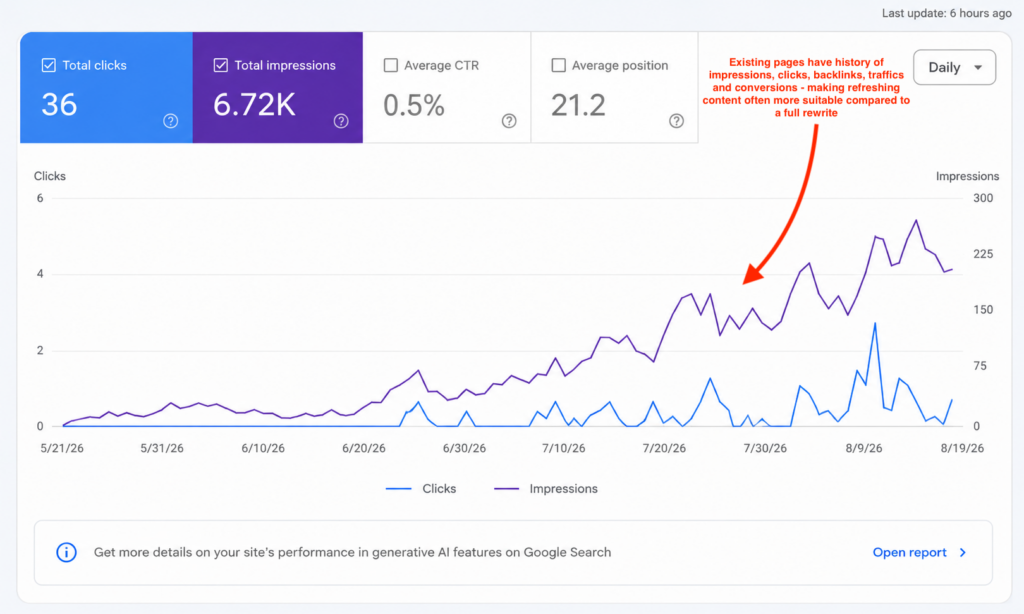
A new article starts with no history whereas an existing page may already have:
- Rankings
- Backlinks
- Internal links
- Search impressions
- Organic traffic
- Conversions
If the topic is still valuable, refreshing the existing page lets you improve an asset you’ve already built instead of creating another URL from scratch.
The decision is simple:
Same topic + same intent → refresh the existing page.
Different topic or substantially different intent → consider a new page.
Refresh vs. rewrite
| Content refresh | Rewrite |
|---|---|
| Keeps the existing URL | May require a new URL |
| Preserves what still works | Rebuilds the page |
| Updates facts and examples | Reworks the entire content |
| Fills specific gaps | Changes the overall approach |
| Best when the topic and intent still fit | Best when the page is fundamentally outdated |
Rule of thumb: If the page is still targeting the right topic and search intent, refresh it. If the page itself is no longer the right answer, consider a rewrite.
Not the same thing: A content refresh has nothing to do with reloading a page in your browser or using Google’s outdated-content removal tool. Those solve completely different problems.
When does a page need a refresh?
Don’t refresh a page just because it’s old. Look for evidence that there is something worth recovering or improving. Common refresh signals include:
- Organic traffic has been falling consistently.
- A valuable keyword has dropped from page one to page two.
- A top-three ranking has slipped.
- Statistics, screenshots, prices, or examples are outdated.
- The current SERP favors a different content format.
- Competitors now answer important questions your page misses.
- The page has lost visibility in AI-generated search experiences.
- Important links or references are no longer valid.
One signal by itself doesn’t always justify a refresh.
For example, a page may lose traffic because search demand has fallen. Before editing it, check whether the opportunity still exists.
Look for recoverable demand.
If people are still searching for the topic and competing pages are getting visibility, a declining page is much more interesting than one whose entire topic has lost demand.
If you want to understand the underlying pattern behind these drops, read our guide to content decay.
How to prioritize which pages to refresh first
You cannot refresh your entire site at once. To get the highest return on your time, you need a systematic way to prioritize which pages to update first.
The best way to start is to run a content audit across your entire website. This gives you a complete inventory of your URLs, their current traffic, and their search impressions.
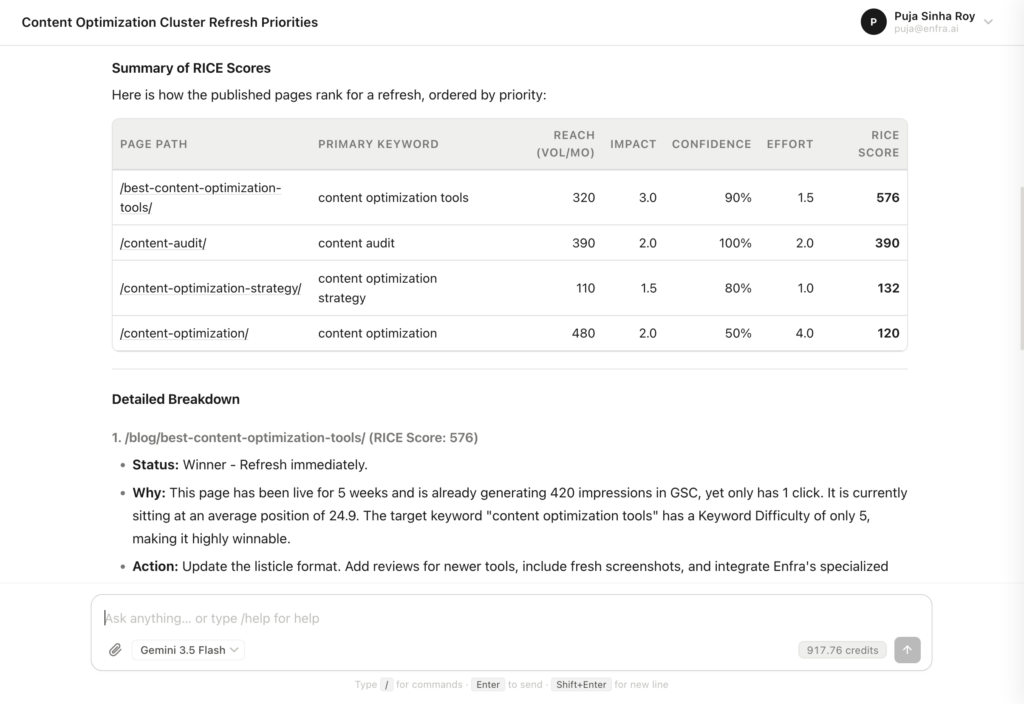
Once you have this raw inventory, you can score each page using the standard RICE scoring method to isolate your high-leverage opportunities:
| Factor | Question | Score |
|---|---|---|
| Reach | How much traffic could this page attract if performance improves? | 1–5 |
| Impact | How much could the refresh realistically improve performance? | 1–5 |
| Confidence | How strong is the evidence that a refresh will help? | 1–5 |
| Effort | How much work will the update require? | 1–5 |
Refresh Score = Reach × Impact × Confidence ÷ Effort
Simply ask Enfra which pages from your cluster are worth a content refresh according to the RICE scoring method, and it runs a full check on all pages from that cluster.

The content refresh process
Once you’ve picked a page, don’t start editing immediately.
First figure out why the page lost ground. Then make changes that address that problem. If you want to see that process on a real page, our guide on how to refresh old blog posts walks through the update step by step.
1. Audit the page against the live SERP
Once your prioritization framework has identified which page to update, you must transition from site-wide numbers to on-page copy. Your goal here is to find out exactly why competitors are outranking you and prioritize the updates that will drive the fastest results.
To do this, analyze the top three pages currently ranking for your target keyword. This diagnostic phase is the core of modern content optimization. where you align your older page with what Google currently rewards.
Look for:
- Topics they cover that you don’t
- Questions they answer that you miss
- Differences in content format
- New information or examples
- Changes in search intent
- Ways they make the answer easier to find
You’re not trying to copy the top results. You’re trying to understand what changed in the SERP since you published your page.
Enfra can help you perform this audit. Simply ask it to audit X page against the live SERP and highlight gaps between your content and the ranking pages. We tried it for our best content optimization tools post, and it covered everything from technical and on-page SEO audit, and content gaps to prioritized fixes by impact to help the page regain visibility and improve rankings.

2. Update outdated information
Check anything on the page that could have changed since publication.
Focus on:
- Statistics
- Dates
- Screenshots
- Pricing
- Product features
- Examples
- External links
- Claims about tools or platforms
Don’t just add new information. Remove or replace information that is no longer true.

3. Make important answers easier to find
Readers shouldn’t have to dig through five paragraphs to find the answer they’re looking for.
Improve the structure by using:
- Descriptive headings
- Direct answers at the start of sections
- Short summaries
- Logical section order
- Bullets where multiple items need to be scanned
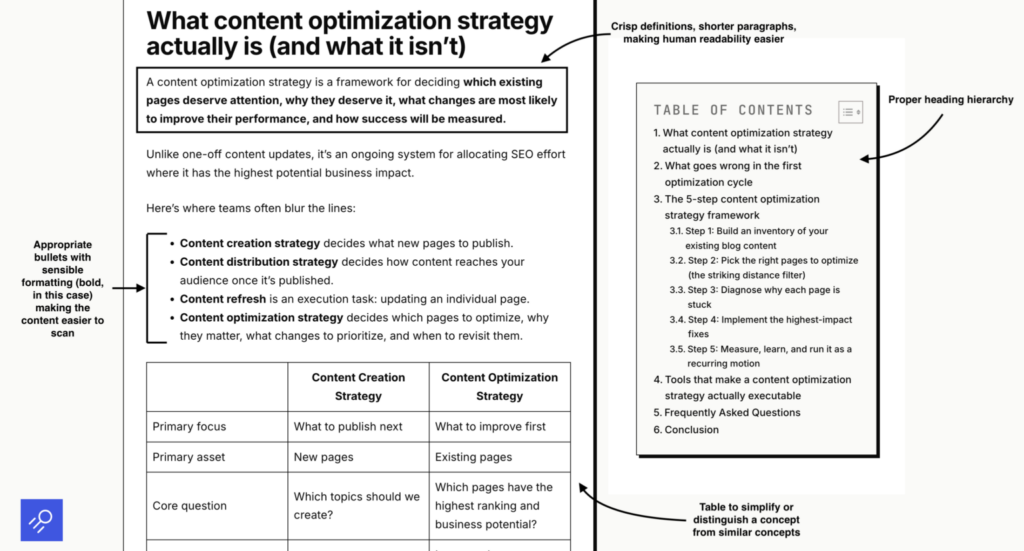
Keep supporting context close to the claim it explains as this also matters for Google AI Overviews. When an answer is clear and easy to identify, it gives Google a better-defined passage to evaluate and potentially surface in an AI-generated answer.
4. Refresh the on-page SEO
Once the content itself is stronger, review the page’s supporting SEO elements.
Check:
- Title tag: Does it still match the query and earn the click?
- Meta description: Does it accurately explain the page?
- Headings: Can someone understand the structure at a glance?
- Internal links: Are there relevant pages you should connect?
- Image alt text: Is it useful where alt text is needed?
- Keywords: Does the page naturally cover the terms relevant to the topic?
- Links: Are any references broken or outdated?


5. Republish and request re-indexing
Once the update is live:
- Publish the revised page.
- Open Google Search Console.
- Inspect the URL.
- Request indexing.
- Record the date of the refresh.

Requesting indexing doesn’t guarantee an immediate ranking change. It simply gives Google a direct way to discover the updated version instead of waiting for the next crawl.
Turn content refreshing into a repeatable system
Refreshing one page is useful.
Building a system that continually identifies the next page worth refreshing is much more valuable.
You need four things:
| System | What it answers |
|---|---|
| Review cadence | When should pages be checked? |
| Owner | Who is responsible for the update? |
| Backlog | Which pages should be refreshed first? |
| Measurement | How will you know the refresh worked? |
With Enfra, you can have the system run checks for your content using the built-in Calendar, have it assign updates to the people responsible for the refresh using our Zoho Projects integration, score pages using the RICE scoring method, and have it measure performance using data from Search Console and Google Analytics. For teams managing several updates at once, a content refresh checklist keeps the process consistent.
The important part is that the system keeps producing your next best refresh opportunity.
How to measure whether your refresh worked
Don’t judge a refresh by how many changes you made. Judge it by what happened afterward.
Record a baseline before you publish the update, then compare it with performance after the page has had enough time to collect meaningful data.
Track these metrics:
- Rankings: Did important queries move up?
- Impressions: Did the page regain search visibility?
- Clicks: Did more people visit from search?
- Engagement and conversions: Did visitors take meaningful actions after arriving?
- AI visibility: Is the page appearing or being cited in AI-generated search experiences where relevant?
Look at the metrics together.
For example, rankings might improve while clicks stay flat because the SERP has changed. Traffic might increase without conversions improving because the page is attracting the wrong audience.
A successful refresh isn’t “we changed 30 things.” It’s “the page performs better for the right reasons.”
Content refresh mistakes to avoid
- Don’t change the URL unnecessarily: If the existing URL is already earning rankings, links, or visibility, don’t change it simply because you refreshed the content.
Keep the URL unless there is a clear strategic reason to replace it. - Don’t remove content that is already working: A refresh isn’t a reason to delete sections just because they look old.
If a section contributes useful information or performs well, improve it instead of removing it blindly. - Don’t refresh based on a hunch: “It’s been two years” isn’t enough. Look at performance data and the current SERP first.
A three-year-old page that still ranks well may need less attention than a six-month-old page that has already lost half its visibility. - Don’t make the page longer just to make it “better”: More words don’t automatically mean more value. Add information when it closes a meaningful gap or helps the reader accomplish something.
- Don’t forget to measure the result: Publishing the update isn’t the end of the process. Record the baseline, monitor the page afterward, and use the result to improve your future refresh decisions.
Frequently asked questions
How often should you refresh old blog posts?
There is no universal schedule. You should review your high-value pages regularly and implement a systematic content refresh strategy when traffic begins to slip. Pages covering fast-changing subjects may need a blog content refresh every few months, while evergreen topics can usually be updated once a year.
Does an SEO content refresh actually improve rankings?
Yes. Running an SEO content refresh is highly effective because you are updating a page that search engines already trust. Instead of building authority from scratch, you can add updated facts, improve user experience, and build topical authority through internal links. This is one of the most efficient forms of content optimization.
What is content decay and how do you spot it?
Content decay is the gradual loss of search traffic and keyword rankings on older pages. It happens when competitors publish newer guides, or when search intent shifts. You can spot decay by monitoring your traffic trends over time, then use a targeted content refresh to update outdated facts and reclaim your position.
What should be included on a content refresh checklist?
A reliable content refresh checklist should guide you through both identification and execution. First, run a content audit to isolate decaying URLs. Once you have chosen a page, audit competitor headings on the live SERP, rewrite outdated sections, update title tags, and fix broken outbound links.
What is the difference between a content refresh and a full rewrite?
A refresh improves an existing page while preserving what already works, keeping the original URL and core headings intact. A full rewrite is only necessary when the search intent has shifted so completely that your existing page structure cannot save it.
Let Enfra find the pages worth refreshing
The manual process works.
The problem is doing it across an entire content library.
You have to find pages that are losing performance, decide which ones are worth fixing, analyze the current SERP, identify content gaps, and work out what needs to change.
That’s where Enfra helps.
Enfra can:
- Identify pages that are losing performance
- Prioritize refresh opportunities
- Analyze the current SERP
- Surface gaps and opportunities
- Recommend updates for your review
So, instead of spending hours building a refresh backlog and investigating every declining page, your team can focus on deciding which changes are worth shipping.

Marketing Engineer at Enfra | Building agentic systems, web applications, and software products.